Most AI tools start with a connector and end with a prompt. You hook them up to GitHub, Slack, Linear, Notion, and your calendar, and every question turns into a frantic round-trip across five different APIs.Your agent rebuilds your company from scratch every single time.We built Thor differently. Underneath everything Thor does is a live graph of your team’s work — what’s in flight, who owns it, what’s blocked, what changed, what was decided. It’s not a knowledge base. It’s not enterprise search. It’s a working picture of how your team runs, kept up to date as you go.
Knowledge bases store artifacts: docs, wiki pages, reports. Useful, but that’s not where work actually happens.Most of the stuff that matters never becomes a clean artifact:
Someone gets blocked in a Slack thread at 4pm.
Scope changes mid-meeting because Sarah raised a concern.
Two engineers commit to reviewing each other’s PRs by Friday.
A product call gets made in three messages and a thumbs-up.
Thor catches all of that. It treats Slack threads, meetings, and tickets as places where work changes — not just text to search later.The graph connects:
Work items stitched together from Slack threads, meeting clips, Linear issues, GitHub PRs, and the documents that actually describe them.
Documents from Notion and Google Docs you explicitly share — specs, PRDs, runbooks, and decision records Thor can search and read when answering questions or drafting work.
People as owners, reviewers, blockers, and decision-makers.
Projects and products picked up from how your team talks about them, not from a perfectly maintained taxonomy nobody has time to keep up.
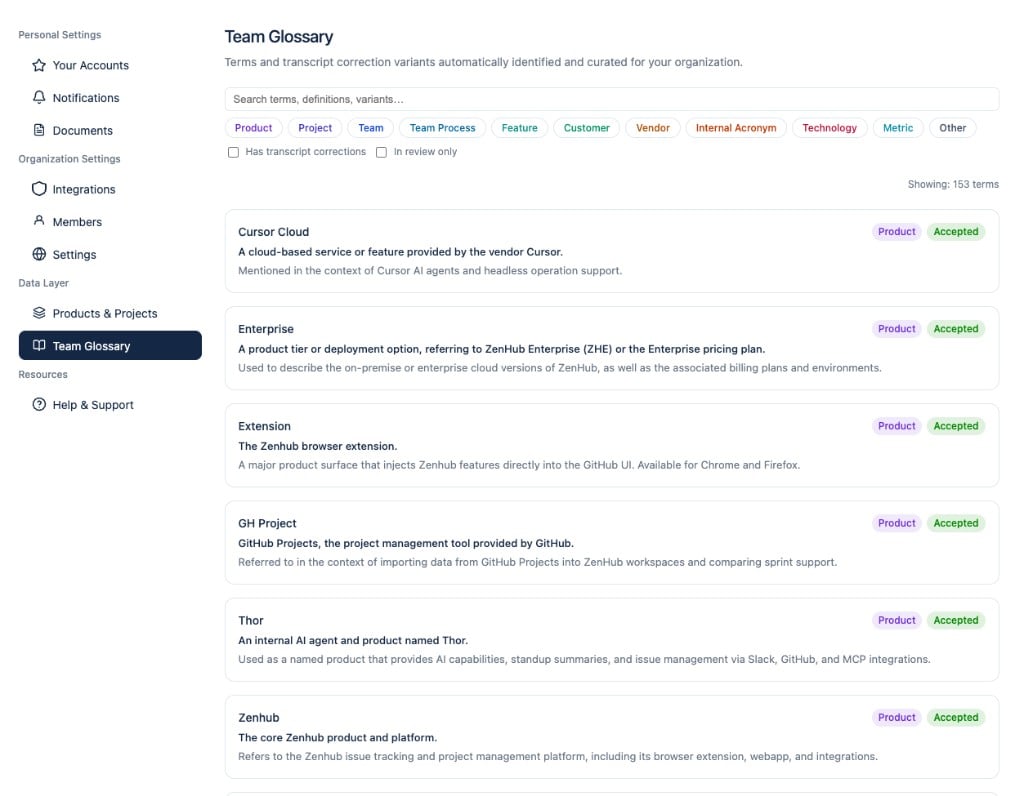
Every org has its own language — product codenames, internal acronyms, customer names, process jargon. Thor centralizes that vocabulary in a Team Glossary: terms are mined from your issues, Slack, and meetings, then injected into prompts so standups, summaries, and agent replies use the words your team actually uses — not generic LLM guesses.Thor’s not a mind reader. If your team only talks about a project in DMs Thor can’t see, it’ll miss it. But for the work that happens in shared channels, meetings, and the tools you’ve connected, Thor builds a surprisingly complete picture.
You could connect your AI agent directly to GitHub MCP, Slack MCP, Linear MCP, Drive MCP, and a calendar MCP. Plenty of teams do.The problem isn’t access. It’s interpretation.A raw GitHub MCP can tell your agent that PR #482 is open. It can’t tell your agent that the PR’s been sitting because the owner has been waiting on design feedback for three days, the design discussion happened in a meeting last Tuesday, and the relevant Linear issue is actually #1041, not the one in the PR description.Thor knows.That’s the difference between tool access and team context. Raw connectors hand your agent a pile of disconnected responses. Thor hands it a graph.
The graph isn’t a one-time export. Thor keeps it up to date as work moves across your tools.That matters more than it sounds. A blocker that got resolved yesterday shouldn’t shape today’s standup. A project whose scope shifted this morning shouldn’t be understood through last week’s stale ticket.And when the tools disagree (a GitHub PR looks unblocked but Slack says the owner is waiting on feedback), Thor reconciles. It surfaces the real state, not the optimistic one.
The same graph that powers your morning Slack briefing also powers Thor’s MCP server. That means:
You can ask Thor in Slack, “what’s blocking the auth migration?” and get a real answer, not a list of search results.
Your coding agent can ask Thor, “what should I know before working on issue #123?” and get the related Slack threads, prior decisions, ownership, and adjacent work in a single call.
Your lead can get a Friday recap that knows the difference between a project that shipped and one that quietly drifted.
Same graph. Same source of truth. No more pasting Slack threads into prompts every time you start a new conversation.