

New Microsoft Teams Support
Thor now lives in Microsoft Teams, the same way it already lives in Slack. Add Thor from the Teams Store or from thor.ai/get-started. An admin connects your Microsoft organization, then Thor walks each person through linking their Microsoft account and their meeting and work tools.You can chat with Thor in a personal chat, a channel, or a group chat. Standups, post-meeting recaps, reminders, and issue creation land in Teams the same way they do in Slack. Thor can also find and summarize past Teams conversations. The Thor app has Connections and Notifications tabs so you can manage integrations and quiet hours without leaving Teams.New Agent Profiles
You can now create agent profiles in the webapp: a named profile for a product, with its own instructions, linked products, and scheduled automations. Anyone in the organization can set one up. Automations can post a report to a Slack or Teams channel, or do the work without posting a final report.Say something like “switch to the Atlas profile” in chat and Thor will use that profile’s instructions for the conversation.New Issue Context Packs
When Thor has something worth adding, it now writes a folded briefing onto the GitHub or Linear issue body. A person sees one line,Additional context (powered by Thor AI). A coding agent reading the issue sees the full context pack: parent work, related PRs, governing docs, meetings, and decisions.You can also pull the same pack from the Thor MCP. If you do not see the block on your tickets yet, email support@thor.ai. Learn more.New GitHub Docs as Context
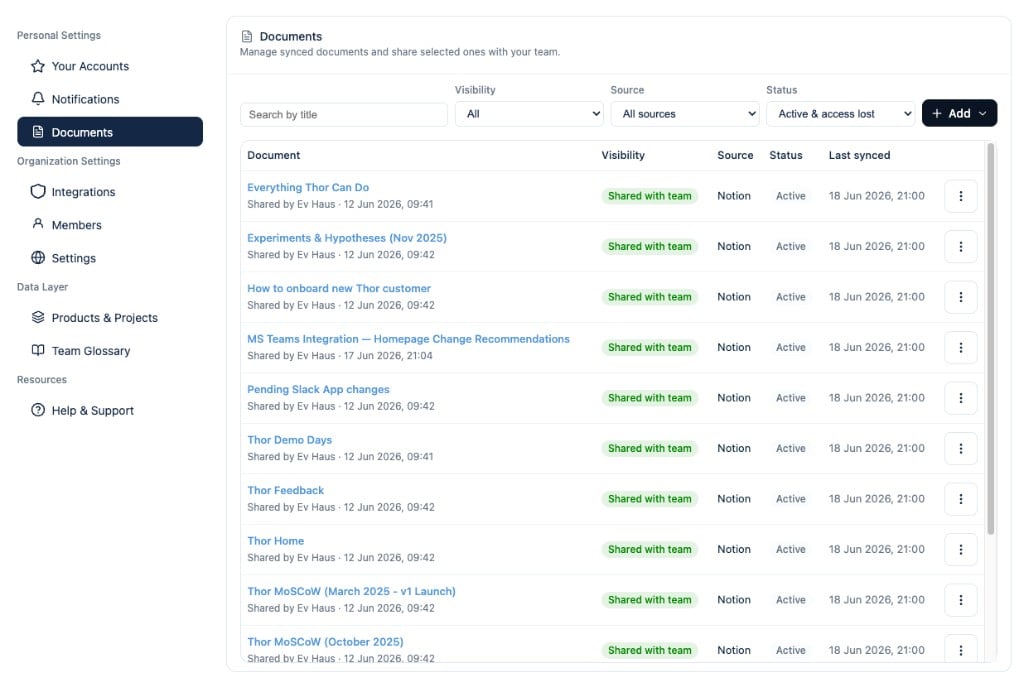
Thor now indexes markdown from your connected GitHub repositories: README files, docs folders, and agent-instruction files likeAGENTS.md, CLAUDE.md, and .cursor/rules/. Enable or remove individual files from the Documents page in the webapp, then ask Thor questions grounded in what the repo actually says.New Hours Thor Can Reach You
You can now set the hours Thor is allowed to message you, per day, in your own timezone. A reminder or nudge that comes due outside those hours is held, not dropped. It arrives when your hours open, usually within about ten minutes.If you ask Thor to remind you at 11pm, Thor asks first. Say yes and it still goes out then. Replies are never held: if you message Thor at midnight, Thor answers at midnight. Set this from Notifications in the webapp, the Teams Notifications tab, or Slack’s Manage Notifications modal.Improved MCP Standups, Evidence, and Feedback
The Thor MCP server can now fetch a standup (yours or a teammate’s), post a standup as a thread reply, pull work item evidence, search that evidence, and apply status or blocker feedback without leaving Cursor or Claude. Standup output can be JSON, markdown, Slack, or Teams. Learn more.Improved Standup Completed vs Upcoming
Daily standups now split work into Completed, Upcoming, and Cancelled, so yesterday’s shipped work is not mixed in with what is still open. Large Slack standups are also packed by product so the message stays readable instead of getting truncated.Improved Faster GitHub & Linear Updates
Issue and pull request changes from GitHub and Linear now reach Thor as they happen, instead of waiting for the next scheduled sync. Standups, reminders, and MCP answers stay closer to the current state of the ticket.Improved Slack Thinking Steps
When you ask Thor something in Slack, the reply now shows thinking steps as Thor works: what it is looking up, and where it is in the answer. You can tell it is still going, instead of staring at a silent typing indicator.Minor Thread Work Item Quality
Thread summaries now only become work items when a human actually said something in the thread. Bot-only chatter is ignored.New Notion & Google Docs Support
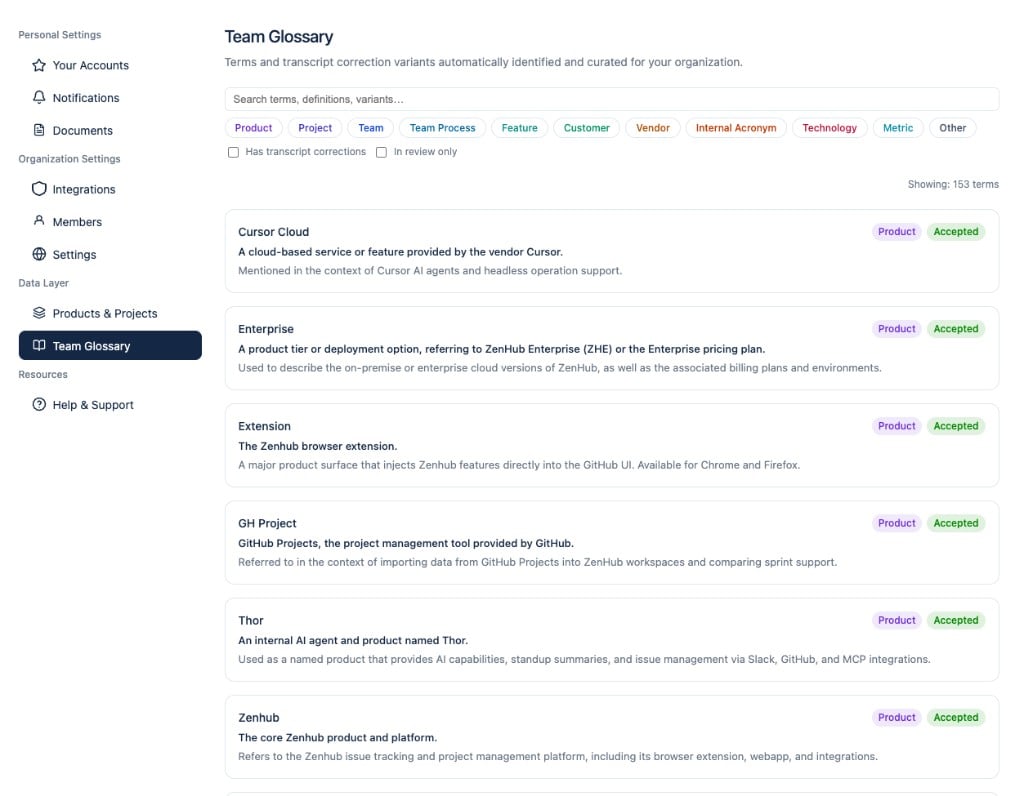
New Team Glossary
New External Specialist Agents (Beta)
Organizations can register external specialist agents (via the A2A protocol) and have Thor delegate focused sub-tasks to them — for example, a security review agent or a domain-specific coding assistant. Thor discovers available specialists, gathers relevant context, and orchestrates multi-round conversations, with an optional confirm-before-call step in Slack. Admins can delete registered agents from the webapp. Contact support@thor.ai to enable this for your organization.Improved Monday Kickoff
The Monday kickoff message has been redesigned as a strategic product dashboard: priorities are grouped by product and project with richer narrative context, so the start-of-week briefing reads less like a flat task list and more like a focused planning brief. Learn more.Improved Team Projects
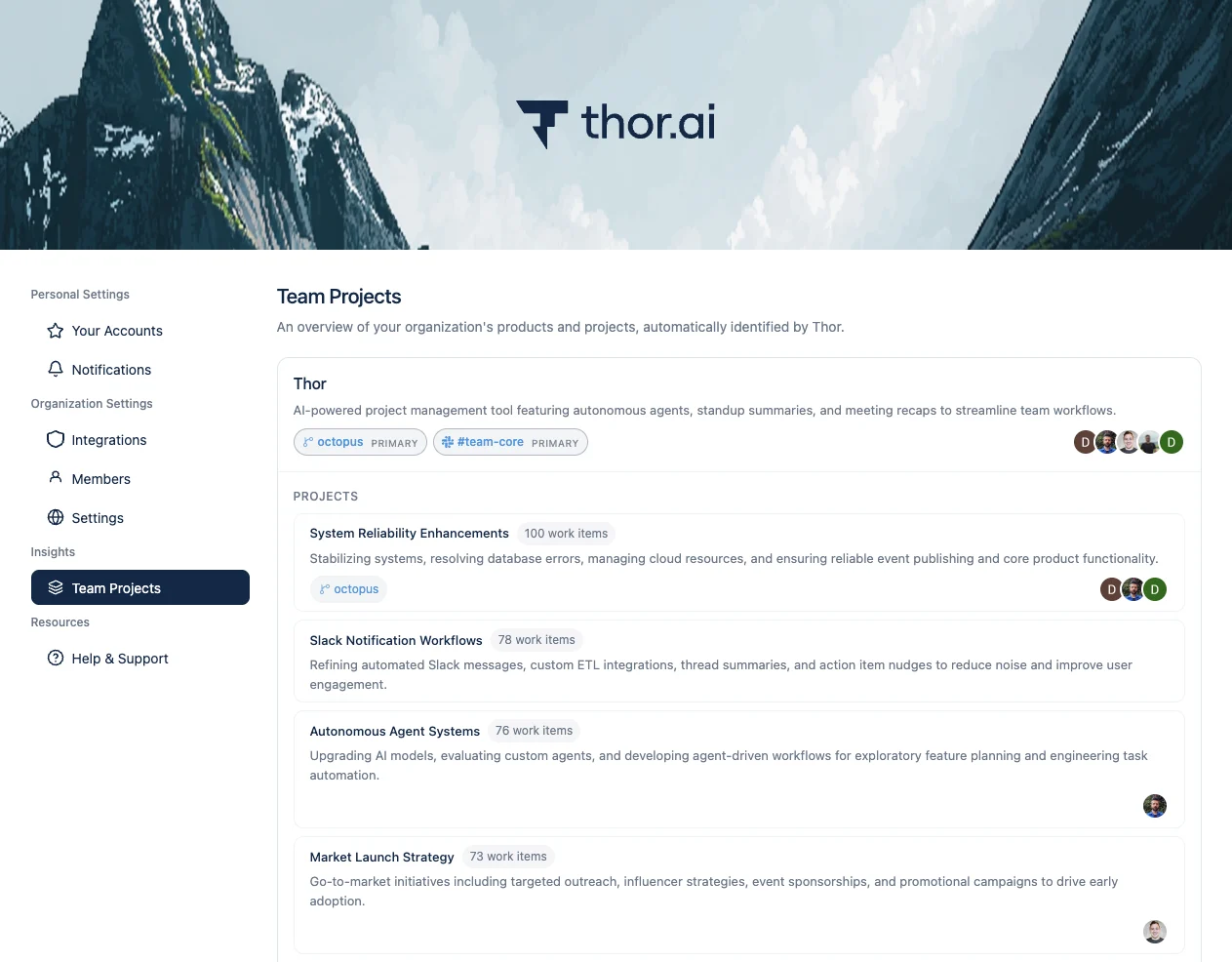
The Team Projects page now supports filtering, search, sorting, and pagination for large organizations. Thor also regenerates project groupings daily and requires at least two related work items before creating a new project, reducing one-off noise in your project taxonomy.Improved Work Item Status Sync
Work items now reconcile their status automatically when linked GitHub issues or pull requests are closed or merged, keeping Thor’s view of in-flight work aligned with your systems of record without manual updates.Improved Google Meet Transcript Reliability
Google Meet transcripts are now ingested through the Google Meet API as the canonical source, with a fallback to Meet transcript entries when Drive export fails. A backfill path is available for calendar events that were missing transcript attachments.Improved MCP Work Item Tools
The Thor MCP server now exposes tools to list your work items and update their status directly from Cursor, Claude, or any other MCP client — so you can triage and sync progress without switching back to Slack. Cursor’s native OAuth redirect URI is also supported for MCP dynamic client registration. Learn more.Improved Issue Creation with Templates
When Thor creates GitHub or Linear issues on your behalf, it now applies your repository’s issue templates where available, producing better-structured tickets out of the box.Improved Standup & Post-Meeting Formatting
Standup summary headers and section formatting have been refreshed for clarity. Post-meeting messages are easier to identify at a glance, action item owners are formatted more consistently, and non-user owners (teams or bots) are attributed correctly.Improved Work Item Quality
Thor now filters out overly broad work items that span too many unrelated sources, relaxes similarity thresholds where appropriate, and reduces runaway expansion — so the work activity in your standups and summaries stays focused on real, actionable items.Improved Recurring Reminders
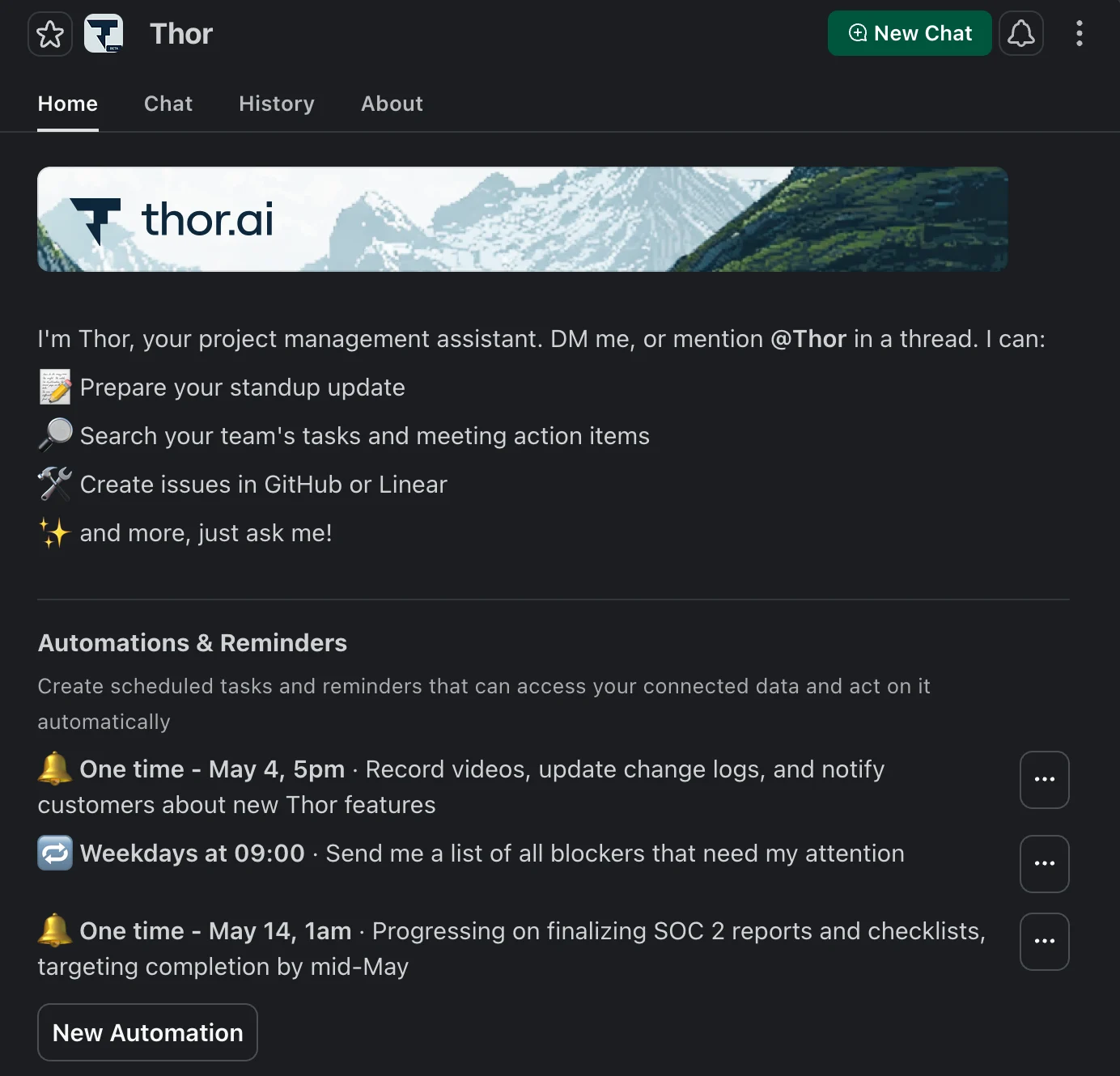
Recurring reminders now fire correctly on weekday-only schedules and respect your local timezone when rendering trigger times.Minor Thread Nudge Timing
Slack thread nudges no longer count weekend hours toward the quiet period, so threads are not nudged prematurely on Monday morning.Minor Weekly Reminder @-Mentions
When Thor replies in a thread for a weekly recap or kickoff reminder, the message now @-mentions you so it is easier to spot in busy channels.Minor Connection Validation
Thor now prevents duplicate Slack or Microsoft providers from being connected to the same organization and surfaces a clear validation error during OAuth if a connection already exists.Minor Meeting & Thread Privacy Accuracy
Fewer meeting and Slack thread work items are incorrectly flagged as private, and Teams meeting transcripts are included reliably in meeting search results.New Thor MCP Server
Thor’s Model Context Protocol (MCP) server is now generally available, so you can connect Thor securely to Cursor, Claude, and any other MCP-compatible client. Using Thor as the data source for your AI workflows is faster, cheaper, more accurate and more reliable than needing to build your own multi-MCP data pipelines. Learn more.New Automation Configuration in Slack
New New Webapp & Automated Project Categorization
Improved Standup Summary Categorization & Context
Standup summaries received a major refresh: items are now grouped by the products and projects they belong to, work items are rendered directly inside the standup message, and a new “Share” button lets you quickly forward a standup to a teammate or channel. “Show TLDR” buttons are now available on both individual and manager standups. Learn more.Improved Post-Meeting Messages
Post-meeting messages are now delivered as DMs only, keeping channels quieter and conversations more personal. Each message now includes the decisions made during the meeting (not just action items), and any action item that was previously discussed in another meeting is flagged with a “Previously Discussed In” reference. End-of-day reminders are batched into a single message instead of one per item. Learn more.Improved Reminders with Quick Actions
Reminders that include work items now show inline quick action buttons, so you can update status or take the next step without typing a single word. Recurring reminder messages also have feedback and cancel buttons to make them easier to manage. Learn more.Improved Slack Thread Search
Thor now has a dedicated Slack thread context tool: when you link or forward a Slack message, Thor will load the full thread (respecting private-channel access) and use keyword-first matching with semantic fallback to find the right conversation. Standup generation also recovers more gracefully when something goes wrong upstream. Try asking Thor, “I remember some time ago we were discussing ___. Help me find it.” Learn more.Improved Data Connection Preview
When you connect a new data provider, Thor now shows your data immediately rather than making you wait for the next sync. The preview also suggests actionable next steps tailored to which tools you’ve connected so far.Improved Google Meet Gemini Notes
Google Meet Gemini Notes ingestion has been overhauled — Thor now matches Gemini Notes to meetings via the conference space hangout link and filters attendees more accurately. Work item summaries generated from meetings are now more succinct and use richer work-activity context.Improved Calendar Status Per Installation
When you connect multiple Google accounts to Thor, each calendar now reports its own connection status truthfully, so you can quickly tell which account needs attention if data goes missing.Improved GitHub App Approval Flow
When a GitHub App installation is approved, both the requester and the approver now receive a notification once approval and the initial sync are complete. The approver’s GitHub user is also automatically linked to their Thor account.Minor Integration Re-authorization in Settings
Thor will now more clearly flag which providers need re-authorization, so admins can fix broken connections before they cause missing data.Minor Delete Organization
Organization admins can now delete their entire Thor organization directly from the webapp, with a confirmation step and full cascading cleanup of related data.Minor Multi-Name User Lookups
When asking Thor about multiple people at once (e.g. “what are Alice and Bob working on?”), Thor now resolves all of the named users in a single lookup for faster, more reliable answers.Minor PR Merge Activity Accuracy
Fixed a class of issues where merged pull requests were attributed to the person who clicked “Merge” rather than the actual PR author, and where some development contributions were missing from standup activity entirely.Minor Issue Creation Robustness
Eliminated duplicate issues that could occur when post-meeting “Create issue” buttons were clicked multiple times in quick succession. Thor will now also prompt you to choose a repository when no default is set, instead of silently failing. Learn more.Technical Linear Authentication Hardening
Thor now supports Linear refresh tokens, so long-running Linear connections stay authenticated automatically without requiring users to manually reconnect.New Slack Thread Nudges
Thor will now nudge Slack threads which have been abandoned or forgotten and still require resolution or further assistance. This helps ensure that no conversation falls through the cracks.New Thor MCP Server (Beta)
You can now connect Thor to your existing AI workflows via MCP. Ask any question that Thor is already good at answering, get a list of your work activity, and prepare for daily standups. Contact us to get early access.Improved Standup Quality & Detail
Standups have received a number of quality improvements:- GitHub commits made outside the main branch and without a linked PR now contribute to work activity.
- Improved detection of blockers, which are now surfaced more prominently in standup summaries.
- Work activity summaries now more clearly highlight high-level goals and reduce technical jargon.
- Every standup summary now includes additional detail and clear source attribution, with call-outs for recently shipped or completed work items.
- If your Slack server has application-specific emojis, Thor will now make use of them.