> ## Documentation Index
> Fetch the complete documentation index at: https://docs.thor.ai/llms.txt
> Use this file to discover all available pages before exploring further.

# Reminders

> Create a recurring reminder with Thor's internal data context, reasoning and summarization engine.

export const ActionButtons = ({labels = "It's done,Later,Not needed", primary = true}) => {
  const items = Array.isArray(labels) ? labels : String(labels).split(",").map(s => s.trim()).filter(Boolean);
  return <div className="mt-3 flex flex-wrap gap-2 group-data-[chat=mcp]:hidden">
      {items.map((label, i) => <span key={label} className={`inline-flex items-center rounded-md px-3 py-1.5 text-[13px] font-medium border ${primary && i === 0 ? "bg-[#007a5a] text-white border-[#007a5a]" : "bg-transparent text-zinc-700 dark:text-zinc-200 border-zinc-300 dark:border-zinc-500"}`}>
          {label}
        </span>)}
    </div>;
};

export const ChatLink = ({children}) => <span className="text-[#1264A3] dark:text-[#1D9BD1] underline underline-offset-2 decoration-[#1264A3]/40 dark:decoration-[#1D9BD1]/40 group-data-[chat=teams]:text-[#5B5FC7] group-data-[chat=teams]:dark:text-[#A6A7DC] group-data-[chat=teams]:decoration-[#5B5FC7]/40 group-data-[chat=mcp]:text-[#79c0ff] group-data-[chat=mcp]:decoration-[#79c0ff]/50 group-data-[chat=mcp]:no-underline font-medium break-all cursor-pointer">
    {children}
  </span>;

export const MsgSection = ({children}) => <div className="mb-2.5 last:mb-0">{children}</div>;

export const McpResult = ({children}) => <div className="hidden group-data-[chat=mcp]:block font-mono text-[13px] leading-relaxed mt-4">
    <div className="mb-1.5 flex items-center gap-2">
      <span className="rounded px-1.5 py-0.5 text-[10px] font-bold uppercase tracking-wide bg-[#1f6feb]/25 text-[#79c0ff] border border-[#1f6feb]/40">
        thor
      </span>
      <span className="text-[11px] text-[#8b949e]">response</span>
    </div>
    <div className="rounded-md border border-[#1f6feb]/35 bg-[#0d1117] px-3 py-2.5 border-l-[3px] border-l-[#1f6feb]">
      <div className="min-w-0 text-[#c9d1d9] whitespace-pre-wrap">{children}</div>
    </div>
  </div>;

export const McpPrompt = ({children}) => <div className="hidden group-data-[chat=mcp]:block font-mono text-[13px] leading-relaxed">
    <div className="mb-1.5 flex items-center gap-2">
      <span className="rounded px-1.5 py-0.5 text-[10px] font-bold uppercase tracking-wide bg-[#238636]/25 text-[#3fb950] border border-[#238636]/40">
        you
      </span>
      <span className="text-[11px] text-[#8b949e]">prompt</span>
    </div>
    <div className="rounded-md border border-[#30363d] bg-[#161b22] px-3 py-2.5">
      <div className="flex gap-2">
        <span className="shrink-0 select-none text-[#3fb950] font-bold">›</span>
        <div className="min-w-0 text-[#e6edf3]">{children}</div>
      </div>
    </div>
  </div>;

export const Mention = ({children}) => <>
    <span className="text-[#1264A3] dark:text-[#1D9BD1] font-medium group-data-[chat=teams]:hidden group-data-[chat=mcp]:hidden">
      @{children}
    </span>
    <span className="hidden group-data-[chat=teams]:inline-flex items-center rounded px-1 mx-0.5 text-[#5B5FC7] dark:text-[#A6A7DC] bg-[#5B5FC7]/10 dark:bg-[#5B5FC7]/20 font-medium">
      @{children}
    </span>
  </>;

export const Message = ({name, bot = false, self = false, time, color, avatar: avatarUrl, children}) => {
  const thorAvatar = "/images/thor-icon.svg";
  const youAvatar = "/images/you-avatar.jpg";
  const resolvedName = bot ? "Thor" : self ? "You" : name || "Alex";
  const resolvedColor = color || "#5095dd";
  const imageAvatar = avatarUrl || (bot ? thorAvatar : self ? youAvatar : null);
  const imagePad = bot && !avatarUrl;
  const avatarNode = () => {
    if (imageAvatar) {
      return <>
          <img src={imageAvatar} alt={resolvedName} className={`h-9 w-9 rounded-lg object-cover shrink-0 group-data-[chat=teams]:hidden ${imagePad ? "bg-[#D9E3E6] p-1.5 object-contain" : ""}`} />
          <img src={imageAvatar} alt={resolvedName} className={`hidden h-8 w-8 rounded-full object-cover shrink-0 group-data-[chat=teams]:block ${imagePad ? "bg-[#E8E8F0] dark:bg-[#2B2B36] p-1 object-contain" : ""}`} />
        </>;
    }
    return <>
        <div className="h-8 w-8 rounded-lg shrink-0 flex items-center justify-center text-white text-xs font-semibold group-data-[chat=teams]:hidden" style={{
      backgroundColor: resolvedColor
    }}>
          {resolvedName.slice(0, 1).toUpperCase()}
        </div>
        <div className="hidden h-8 w-8 rounded-full shrink-0 items-center justify-center text-white text-xs font-semibold group-data-[chat=teams]:flex" style={{
      backgroundColor: resolvedColor
    }}>
          {resolvedName.slice(0, 1).toUpperCase()}
        </div>
      </>;
  };
  return <>
      <div className="flex gap-2.5 items-start rounded-lg px-2 py-1.5 hover:bg-zinc-50 dark:hover:bg-white/5 group-data-[chat=teams]:hidden group-data-[chat=mcp]:hidden">
        {avatarNode()}
        <div className="min-w-0 flex-1">
          <div className="flex items-baseline gap-2 flex-wrap">
            <span className="text-[15px] font-bold text-zinc-900 dark:text-zinc-100">
              {resolvedName}
            </span>
            {bot ? <span className="rounded px-1 py-px text-[10px] font-bold uppercase tracking-wide bg-[#E8F5FA] text-[#1264A3] dark:bg-[#1D9BD1]/20 dark:text-[#1D9BD1]">
                App
              </span> : null}
            {time ? <span className="text-[12px] text-zinc-500">{time}</span> : null}
          </div>
          <div className="text-[15px] leading-relaxed text-zinc-800 dark:text-zinc-200 mt-0.5">
            {children}
          </div>
        </div>
      </div>

      <div className="hidden group-data-[chat=teams]:flex gap-2.5 items-start">
        {avatarNode()}
        <div className="min-w-0 max-w-[92%]">
          <div className="flex items-baseline gap-2 mb-1">
            <span className="text-[13px] font-semibold text-zinc-900 dark:text-zinc-100">
              {resolvedName}
            </span>
            {bot ? <span className="rounded px-1 py-px text-[10px] font-semibold uppercase tracking-wide bg-[#5B5FC7]/15 text-[#5B5FC7] dark:text-[#A6A7DC]">
                Bot
              </span> : null}
            {time ? <span className="text-[11px] text-zinc-500">{time}</span> : null}
          </div>
          <div className={`rounded-md px-3 py-2 text-[13px] leading-relaxed text-zinc-800 dark:text-zinc-100 shadow-sm ${bot ? "bg-white dark:bg-[#292929] border border-[#5B5FC7]/25" : "bg-white dark:bg-[#292929]"}`}>
            {children}
          </div>
        </div>
      </div>
    </>;
};

export const Conversation = ({channel = "general", type = "channel", defaultPlatform, platforms = "slack,teams,mcp", children}) => {
  const available = platforms.split(",").map(p => p.trim()).filter(Boolean);
  const initial = defaultPlatform && available.includes(defaultPlatform) ? defaultPlatform : available[0] || "slack";
  const [platform, setPlatform] = useState(initial);
  const thorAvatar = "/images/thor-icon.svg";
  const isDm = type === "dm";
  const title = isDm ? "Thor" : channel.replace(/^#/, "");
  const showTabs = available.length > 1;
  const tabClass = active => `inline-flex items-center gap-1.5 rounded-md px-2.5 py-1.5 text-xs font-medium transition-colors ${active ? "bg-white dark:bg-zinc-800 text-zinc-900 dark:text-zinc-100 shadow-sm" : "text-zinc-500 hover:text-zinc-800 dark:hover:text-zinc-200"}`;
  const slackIcon = () => <svg viewBox="0 0 20 20" className="h-3.5 w-3.5" aria-hidden="true">
      <path fill="currentColor" d="M4.5 12.7a1.6 1.6 0 1 1-1.6-1.6h1.6v1.6zm.8 0a1.6 1.6 0 1 1 3.2 0v4a1.6 1.6 0 1 1-3.2 0v-4zM7.3 4.5a1.6 1.6 0 1 1 1.6-1.6v1.6H7.3zm0 .8a1.6 1.6 0 1 1 0 3.2h-4a1.6 1.6 0 1 1 0-3.2h4zM15.5 7.3a1.6 1.6 0 1 1 1.6 1.6h-1.6V7.3zm-.8 0a1.6 1.6 0 1 1-3.2 0v-4a1.6 1.6 0 1 1 3.2 0v4zM12.7 15.5a1.6 1.6 0 1 1-1.6 1.6v-1.6h1.6zm0-.8a1.6 1.6 0 1 1 0-3.2h4a1.6 1.6 0 1 1 0 3.2h-4z" />
    </svg>;
  const teamsIcon = () => <svg viewBox="0 0 20 20" className="h-3.5 w-3.5" aria-hidden="true">
      <path fill="currentColor" d="M11.2 4.2a2.4 2.4 0 1 1 2.5 2.4h-.1a2.4 2.4 0 0 1-2.4-2.4zm-6.3.6a2.1 2.1 0 1 1 2.2 2h-.1a2.1 2.1 0 0 1-2.1-2zm6.5 3.4h4.2c.8 0 1.4.6 1.4 1.4v4.1a3.4 3.4 0 0 1-3.4 3.4h-.3A4.3 4.3 0 0 0 17 13.2V8.8c0-.9-.7-1.6-1.6-1.6h-4zm-6.6.3h4.6c.7 0 1.3.6 1.3 1.3v5.1A3.7 3.7 0 0 1 7 18.6H6.3A3.7 3.7 0 0 1 2.6 14.9V9.8c0-.7.6-1.3 1.3-1.3z" />
    </svg>;
  const mcpIcon = () => <svg viewBox="0 0 20 20" className="h-3.5 w-3.5" aria-hidden="true">
      <path fill="currentColor" d="M4 5.5A1.5 1.5 0 0 1 5.5 4h9A1.5 1.5 0 0 1 16 5.5v9a1.5 1.5 0 0 1-1.5 1.5h-9A1.5 1.5 0 0 1 4 14.5v-9zM6 7v1.5h1.75V7H6zm3.25 0v1.5H11V7H9.25zM12.5 7v1.5H14.25V7H12.5zM6 10v1.5h8.25V10H6zm0 3v1.5h5V13H6z" />
    </svg>;
  let frame;
  if (platform === "mcp") {
    frame = <div className="overflow-hidden rounded-xl border border-zinc-700 shadow-sm not-prose bg-[#0d1117]">
        <div className="flex items-center gap-2 border-b border-zinc-700/80 bg-[#161b22] px-3 py-2">
          <div className="flex items-center gap-1.5">
            <span className="h-2.5 w-2.5 rounded-full bg-[#ff5f56]" />
            <span className="h-2.5 w-2.5 rounded-full bg-[#ffbd2e]" />
            <span className="h-2.5 w-2.5 rounded-full bg-[#27c93f]" />
          </div>
          <div className="min-w-0 flex-1 text-center font-mono text-[11px] text-[#8b949e] truncate">
            thor mcp — cursor / claude
          </div>
          <div className="w-10" />
        </div>
        <div className="px-4 py-4 space-y-1 min-h-[7rem]">
          <div className="font-mono text-[11px] text-[#8b949e] mb-3">
            <span className="text-[#79c0ff]">mcp</span>
            <span className="text-[#8b949e]">:</span>
            <span className="text-[#a5d6ff]">thor</span>
            <span className="text-[#8b949e]">$ </span>
            <span className="text-[#c9d1d9]">ask</span>
          </div>
          {children}
          <div className="font-mono text-[13px] text-[#7ee787] mt-4 animate-pulse">
            ▍
          </div>
        </div>
      </div>;
  } else if (platform === "teams") {
    frame = <div className="overflow-hidden rounded-xl border border-zinc-200 dark:border-zinc-700 shadow-sm not-prose">
        <div className="flex items-center gap-2.5 bg-[#5B5FC7] px-3 py-2.5">
          {isDm ? <img src={thorAvatar} alt="" className="h-6 w-6 rounded-full bg-white/90 p-0.5 object-contain" /> : <div className="flex h-6 w-6 items-center justify-center rounded bg-white/15 text-white text-xs font-bold">
              #
            </div>}
          <div className="min-w-0">
            <div className="text-sm font-semibold text-white truncate">
              {title}
            </div>
            <div className="text-[11px] text-white/70">
              {isDm ? "Chat · Microsoft Teams" : "Microsoft Teams"}
            </div>
          </div>
        </div>
        <div className="bg-[#F5F5F5] dark:bg-[#1F1F1F] px-3 py-3 space-y-3">
          {children}
        </div>
      </div>;
  } else {
    frame = <div className="overflow-hidden rounded-xl border border-zinc-200 dark:border-zinc-700 shadow-sm not-prose">
        <div className="flex items-center gap-2 border-b border-zinc-200 dark:border-zinc-700 bg-white dark:bg-[#1A1D21] px-3 py-2.5">
          {isDm ? <img src={thorAvatar} alt="" className="h-5 w-5 rounded bg-[#D9E3E6] p-0.5 object-contain" /> : <span className="text-zinc-500 dark:text-zinc-400 text-lg leading-none">
              #
            </span>}
          <span className="text-sm font-bold text-zinc-900 dark:text-zinc-100">
            {title}
          </span>
        </div>
        <div className="bg-white dark:bg-[#1A1D21] px-2 py-3 space-y-1">
          {children}
        </div>
      </div>;
  }
  return <div className="my-4 not-prose group" data-chat={platform}>
      {showTabs ? <div className="mb-2 inline-flex flex-wrap items-center rounded-lg border border-zinc-200 dark:border-zinc-700 bg-zinc-50 dark:bg-zinc-900 p-0.5">
          {available.includes("slack") ? <button type="button" onClick={() => setPlatform("slack")} className={tabClass(platform === "slack")}>
              {slackIcon()}
              Slack
            </button> : null}
          {available.includes("teams") ? <button type="button" onClick={() => setPlatform("teams")} className={tabClass(platform === "teams")}>
              {teamsIcon()}
              Teams
            </button> : null}
          {available.includes("mcp") ? <button type="button" onClick={() => setPlatform("mcp")} className={tabClass(platform === "mcp")}>
              {mcpIcon()}
              MCP
            </button> : null}
        </div> : null}

      {frame}

      {platform === "mcp" && showTabs ? <p className="mt-2 text-xs text-zinc-500 dark:text-zinc-400">
          Same workflows via Thor's{" "}
          <a href="/usecases/mcp" className="underline underline-offset-2">
            MCP server
          </a>{" "}
          in Cursor, Claude, or any MCP client.
        </p> : null}
    </div>;
};

# Use cases

## Create a complex reminder

<iframe className="w-full aspect-video rounded-xl" src="https://www.youtube.com/embed/NZcF6CoTcNQ" title="YouTube video player" frameBorder="0" allow="accelerometer; autoplay; clipboard-write; encrypted-media; gyroscope; picture-in-picture" allowFullScreen />

Thor has an internal CRON engine that can be used to create complex recurring reminders using all the internal data context Thor has about you and your team:

<Conversation type="dm">
  <Message self time="4:02 PM">
    Hey <Mention>Thor</Mention>, every Friday at 4pm, compile a list of all tasks, meetings and discussions I completed during the week, remove any technical jargon, highlight any important customer-facing work and send it to my boss Sally.
  </Message>

  <Message bot time="4:02 PM">
    Scheduled — every Friday at 4:00pm in your timezone. I'll write it for a non-technical audience, call out customer-facing work, and DM Sally the summary. You can edit or pause this anytime from Automations.
  </Message>

  <McpPrompt>
    Use the Thor MCP to schedule a Friday 4pm reminder that compiles my week of work for Sally in non-technical language, highlighting customer-facing work.
  </McpPrompt>

  <McpResult>
    Scheduled — every Friday 4:00pm
    Audience: non-technical · deliver to Sally · pause/edit via Automations
  </McpResult>
</Conversation>

## Weekly Messages

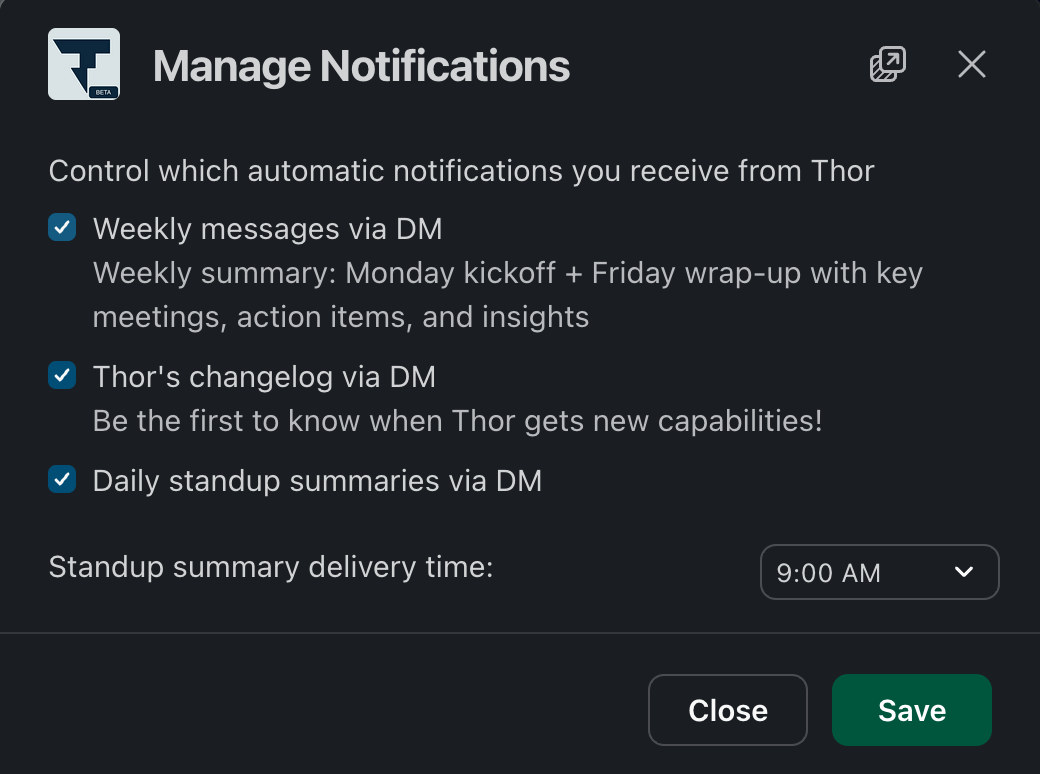
Thor can automatically send you a weekly recap at the end of Friday with a list of everything you accomplished, any outstanding action items & insights from the week. Additionally, Thor can send you a Monday kickoff message at the start of the week with a list of your priorities for the week.

To enable this, click on "Manage Notifications" from the Thor "Home" tab and toggle "Weekly messages via DM" to on.

<img src="https://mintcdn.com/thor/ZicLt5N2ZynC2LYK/images/usecase-weekly-messages.png?fit=max&auto=format&n=ZicLt5N2ZynC2LYK&q=85&s=f2d2ba632996fee37434bd8b0a93eb67" alt="weekly-messages" width="1040" height="774" data-path="images/usecase-weekly-messages.png" />

## Quick actions on reminders

When a reminder includes a work item (an issue, PR or task), Thor renders inline quick action buttons directly in the message — so you can update status or take the next step without typing a single word. This updates the status of the work item immediately and keeps your systems of record in sync.

<Conversation type="dm">
  <Message bot time="Friday at 1:00 AM">
    <MsgSection>
      On Monday in the standup, you planned to update the Thor change log, create new feature videos, and refresh the docs for this week's recent changes. Let me know if you want help turning that into tracked issues or prioritizing the work.
    </MsgSection>

    <MsgSection>
      <div>🐙 <ChatLink>#46243 feat: migrate changelog from Headway to Plain Help Center</ChatLink></div>
      <div>🐙 <ChatLink>#2838 Thor v1.2 (March Public Launch)</ChatLink></div>
    </MsgSection>

    <ActionButtons />
  </Message>

  <McpPrompt>
    Use the Thor MCP to show my open reminder about the changelog and docs work, with the linked issues.
  </McpPrompt>

  <McpResult>
    Reminder — changelog, feature videos, docs refresh
    \#46243 feat: migrate changelog from Headway to Plain Help Center
    \#2838 Thor v1.2 (March Public Launch)
  </McpResult>
</Conversation>

## Manage automations from Slack

<iframe className="w-full aspect-video rounded-xl" src="https://www.youtube.com/embed/2QvtB0yrc-U" title="YouTube video player" frameBorder="0" allow="accelerometer; autoplay; clipboard-write; encrypted-media; gyroscope; picture-in-picture" allowFullScreen />

You can manage all of your Thor automations and reminders directly from the Thor Slack app's **Home** tab — no need to leave Slack:

* **Browse** all of your active datetime triggers at a glance, with timezone-aware previews of exactly when each one will fire.
* **Create** new automations and reminders, including fully custom prompts driven by Thor's CRON engine.
* **Edit or delete** existing automations from an overflow menu.

Open the Thor app in Slack, switch to the **Home** tab, and your automations will appear there.