Same workflows via Thor's{" "}
MCP server
{" "}
in Cursor, Claude, or any MCP client.
: null}
;
};
### New Notion & Google Docs Support
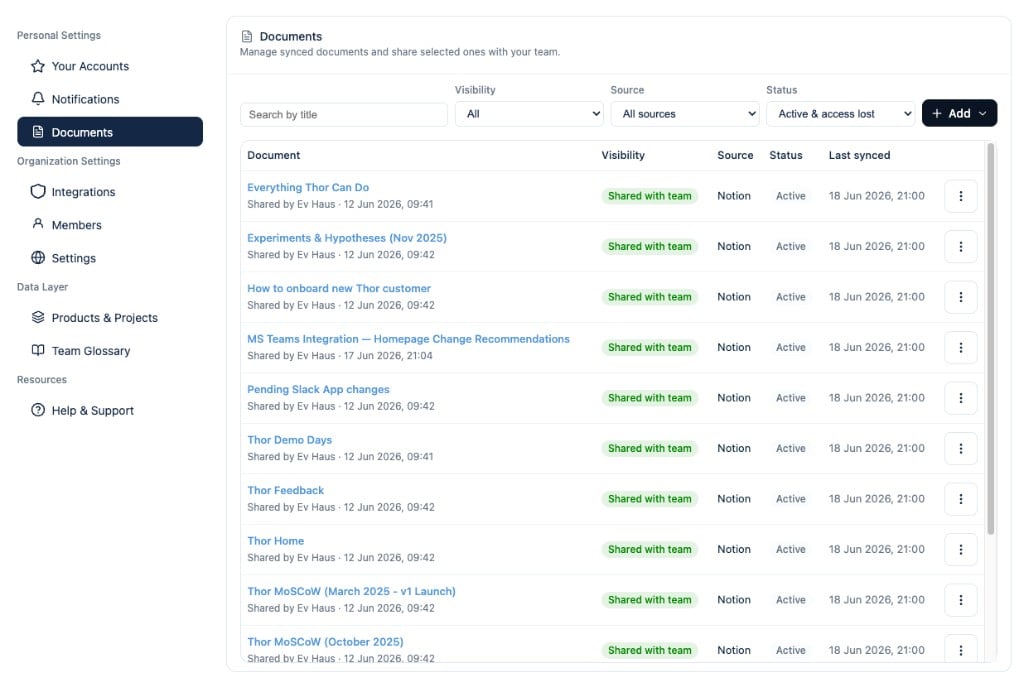
Thor now supports **Notion** and **Google Docs** as document context in the data layer. Connect your accounts from **Your Connections** in the Thor Slack app, then ask Thor to check whether work aligns with a spec, draft issues from a requirements doc, or answer questions grounded in what your team already wrote.
A new **Documents** section in the webapp lets admins see which pages and docs are registered, share document access with teammates, and spot connections that need attention after a reconnect. [Learn more](/usecases/docs).
### New Team Glossary
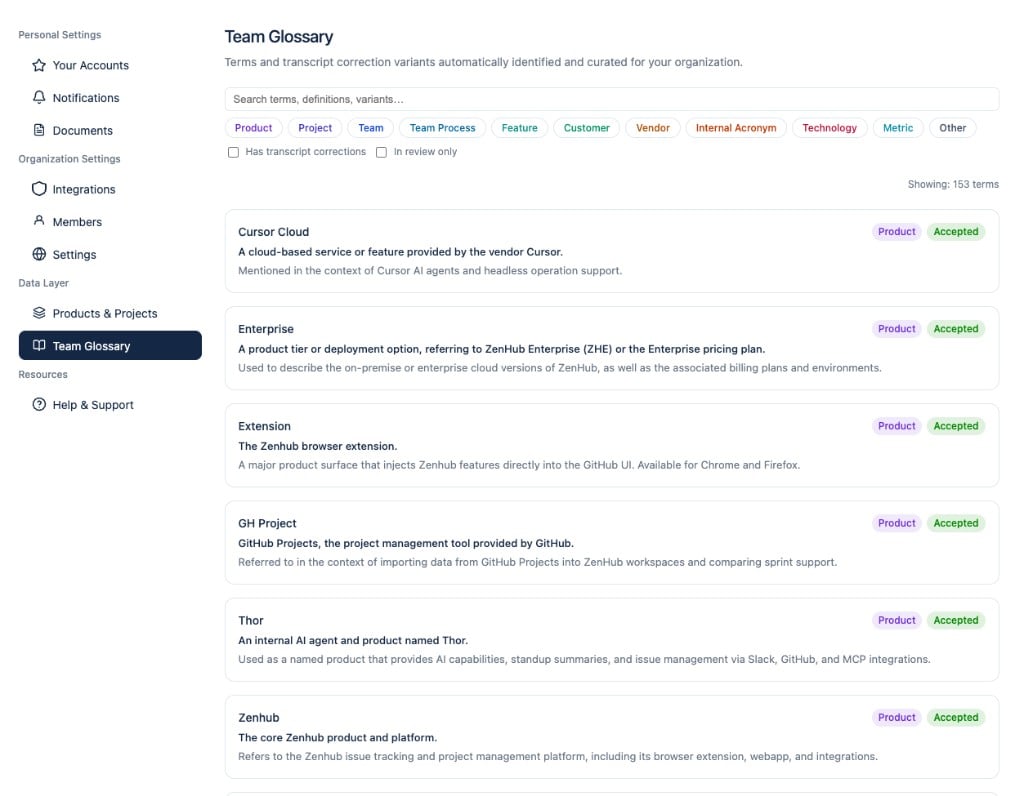
Thor now builds an organization-specific **Team Glossary** from your issues, Slack messages, and meeting transcripts — product names, project codenames, abbreviations, and internal jargon. Matching terms are injected into Thor's prompts so standups, meeting summaries, and agent replies use the vocabulary your team actually uses. Browse and review extracted terms from the **Team Glossary** page in the webapp.
### New External Specialist Agents (Beta)
Organizations can register **external specialist agents** (via the A2A protocol) and have Thor delegate focused sub-tasks to them — for example, a security review agent or a domain-specific coding assistant. Thor discovers available specialists, gathers relevant context, and orchestrates multi-round conversations, with an optional confirm-before-call step in Slack. Admins can delete registered agents from the webapp. Contact [support@thor.ai](mailto:support@thor.ai) to enable this for your organization.
### Improved Monday Kickoff
The Monday kickoff message has been redesigned as a **strategic product dashboard**: priorities are grouped by product and project with richer narrative context, so the start-of-week briefing reads less like a flat task list and more like a focused planning brief. [Learn more](/usecases/reminders#weekly-messages).
### Improved Team Projects
The **Team Projects** page now supports filtering, search, sorting, and pagination for large organizations. Thor also regenerates project groupings daily and requires at least two related work items before creating a new project, reducing one-off noise in your project taxonomy.
### Improved Work Item Status Sync
Work items now reconcile their status automatically when linked GitHub issues or pull requests are closed or merged, keeping Thor's view of in-flight work aligned with your systems of record without manual updates.
### Improved Google Meet Transcript Reliability
Google Meet transcripts are now ingested through the **Google Meet API** as the canonical source, with a fallback to Meet transcript entries when Drive export fails. A backfill path is available for calendar events that were missing transcript attachments.
### Improved MCP Work Item Tools
The Thor MCP server now exposes tools to **list your work items** and **update their status** directly from Cursor, Claude, or any other MCP client — so you can triage and sync progress without switching back to Slack. Cursor's native OAuth redirect URI is also supported for MCP dynamic client registration. [Learn more](/usecases/mcp).
### Improved Issue Creation with Templates
When Thor creates GitHub or Linear issues on your behalf, it now applies your repository's **issue templates** where available, producing better-structured tickets out of the box.
### Improved Standup & Post-Meeting Formatting
Standup summary headers and section formatting have been refreshed for clarity. Post-meeting messages are easier to identify at a glance, action item owners are formatted more consistently, and non-user owners (teams or bots) are attributed correctly.
### Improved Work Item Quality
Thor now filters out overly broad work items that span too many unrelated sources, relaxes similarity thresholds where appropriate, and reduces runaway expansion — so the work activity in your standups and summaries stays focused on real, actionable items.
### Improved Recurring Reminders
Recurring reminders now fire correctly on **weekday-only** schedules and respect your local timezone when rendering trigger times.
### Minor Thread Nudge Timing
Slack thread nudges no longer count weekend hours toward the quiet period, so threads are not nudged prematurely on Monday morning.
### Minor Weekly Reminder @-Mentions
When Thor replies in a thread for a weekly recap or kickoff reminder, the message now @-mentions you so it is easier to spot in busy channels.
### Minor Connection Validation
Thor now prevents duplicate Slack or Microsoft providers from being connected to the same organization and surfaces a clear validation error during OAuth if a connection already exists.
### Minor Meeting & Thread Privacy Accuracy
Fewer meeting and Slack thread work items are incorrectly flagged as private, and Teams meeting transcripts are included reliably in meeting search results.
### New Thor MCP Server
Thor's Model Context Protocol (MCP) server is now generally available, so you can connect Thor securely to Cursor, Claude, and any other MCP-compatible client. Using Thor as the data source for your AI workflows is faster, cheaper, more accurate and more reliable than needing to build your own multi-MCP data pipelines. [Learn more](/usecases/mcp).
### New Automation Configuration in Slack
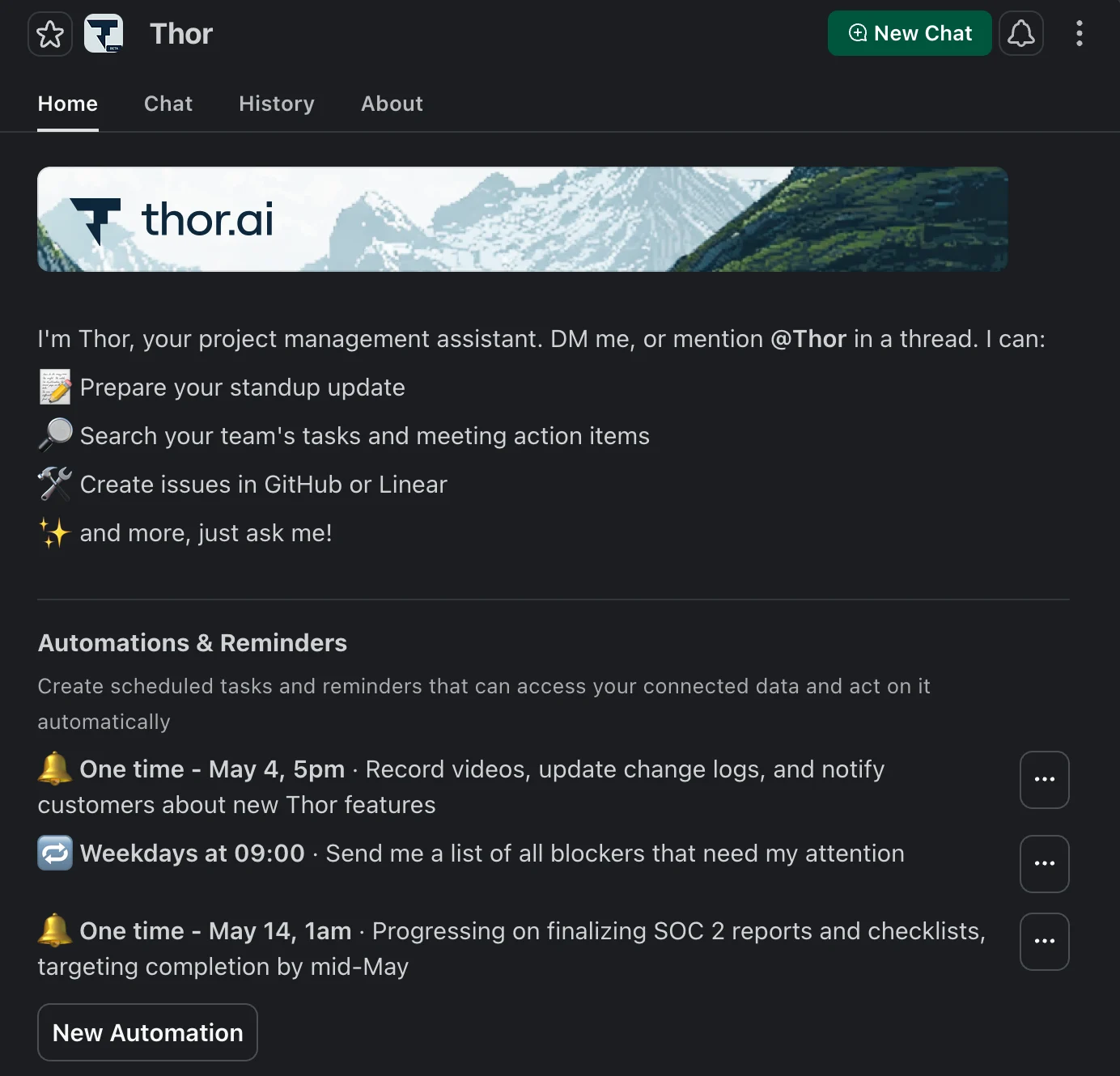
You can now manage all of your Thor automations and reminders directly from the Thor Slack app's "Home" tab. Browse your active datetime triggers at a glance, create new ones (including fully custom automations), and edit or delete existing ones from an overflow menu — no need to leave Slack. Previews and timezone-aware scheduling make it easy to confirm exactly when each automation will fire. [Learn more](/usecases/reminders#manage-automations-from-slack).
### New New Webapp & Automated Project Categorization
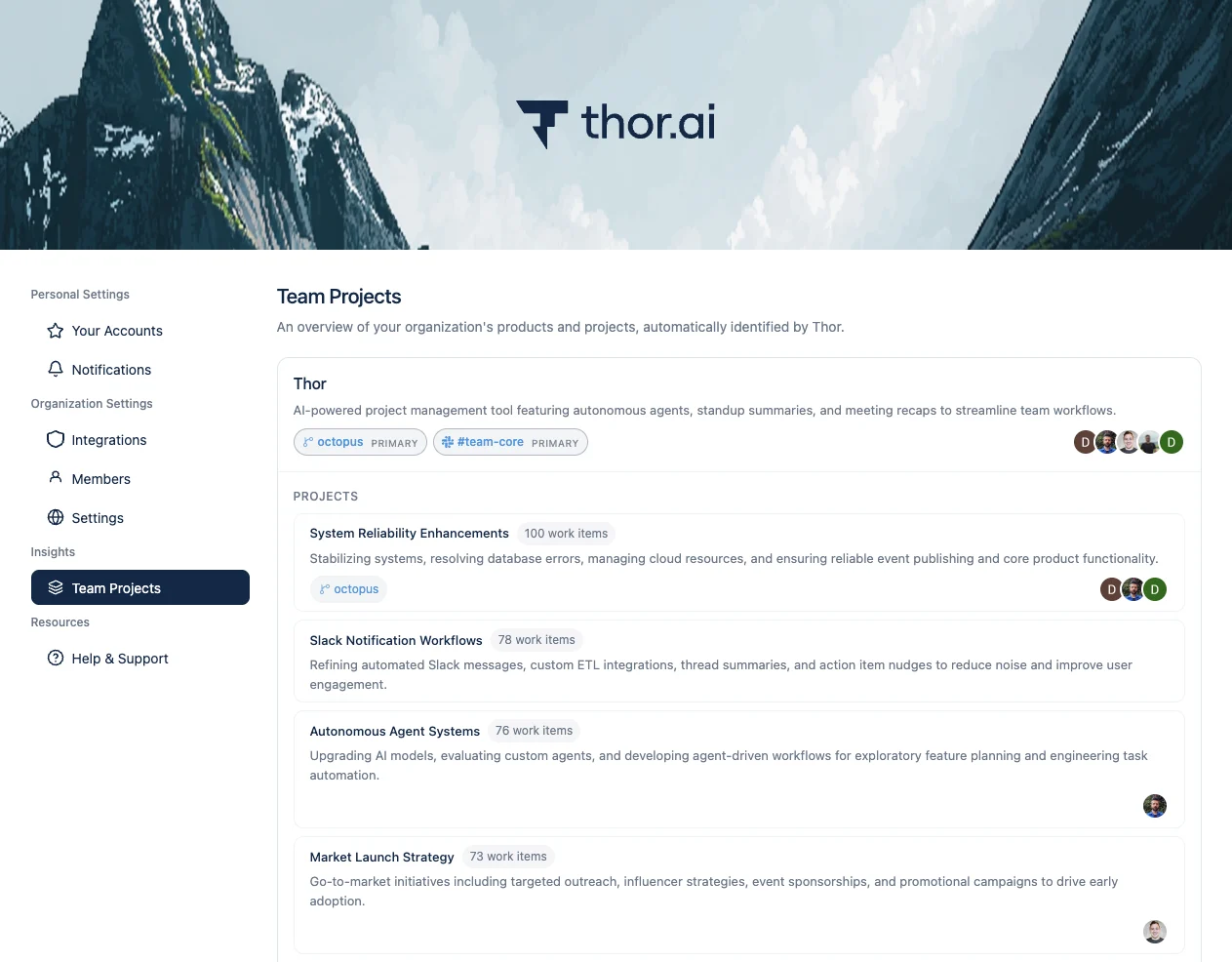
The Thor webapp has been rebuilt from the ground up with new configuration options for personal settings, organization connections, team management, and integration health. Alongside the redesign, Thor now automatically categorizes your work into Products and Projects: a new "Team Projects" insights page surfaces the groups Thor has identified across your tools, and a new background classifier continuously detects new products and tracks scope drift over time.
### Improved Standup Summary Categorization & Context
Standup summaries received a major refresh: items are now grouped by the products and projects they belong to, work items are rendered directly inside the standup message, and a new "Share" button lets you quickly forward a standup to a teammate or channel. "Show TLDR" buttons are now available on both individual and manager standups. [Learn more](/usecases/standups#whats-in-your-standup).
### Improved Post-Meeting Messages
Post-meeting messages are now delivered as DMs only, keeping channels quieter and conversations more personal. Each message now includes the decisions made during the meeting (not just action items), and any action item that was previously discussed in another meeting is flagged with a "Previously Discussed In" reference. End-of-day reminders are batched into a single message instead of one per item. [Learn more](/usecases/meetings#get-a-summary-of-meeting-action-items-and-decisions).
### Improved Reminders with Quick Actions
On Monday in the standup, you planned to update the Thor change log, create new feature videos, and refresh the docs for this week's recent changes. Let me know if you want help turning that into tracked issues or prioritizing the work.
🐙 #46243 feat: migrate changelog from Headway to Plain Help Center
🐙 #2838 Thor v1.2 (March Public Launch)
Use the Thor MCP to show my open reminder about the changelog and docs work, with the linked issues.
Reminder — changelog, feature videos, docs refresh
\#46243 feat: migrate changelog from Headway to Plain Help Center
\#2838 Thor v1.2 (March Public Launch)
Reminders that include work items now show inline quick action buttons, so you can update status or take the next step without typing a single word. Recurring reminder messages also have feedback and cancel buttons to make them easier to manage. [Learn more](/usecases/reminders#quick-actions-on-reminders).
### Improved Slack Thread Search
Thor now has a dedicated Slack thread context tool: when you link or forward a Slack message, Thor will load the full thread (respecting private-channel access) and use keyword-first matching with semantic fallback to find the right conversation. Standup generation also recovers more gracefully when something goes wrong upstream. Try asking Thor, "I remember some time ago we were discussing \_\_\_. Help me find it." [Learn more](/usecases/meetings#find-a-past-slack-discussion).
### Improved Data Connection Preview
When you connect a new data provider, Thor now shows your data immediately rather than making you wait for the next sync. The preview also suggests actionable next steps tailored to which tools you've connected so far.
### Improved Google Meet Gemini Notes
Google Meet Gemini Notes ingestion has been overhauled — Thor now matches Gemini Notes to meetings via the conference space hangout link and filters attendees more accurately. Work item summaries generated from meetings are now more succinct and use richer work-activity context.
### Improved Calendar Status Per Installation
When you connect multiple Google accounts to Thor, each calendar now reports its own connection status truthfully, so you can quickly tell which account needs attention if data goes missing.
### Improved GitHub App Approval Flow
When a GitHub App installation is approved, both the requester and the approver now receive a notification once approval and the initial sync are complete. The approver's GitHub user is also automatically linked to their Thor account.
### Minor Integration Re-authorization in Settings
Thor will now more clearly flag which providers need re-authorization, so admins can fix broken connections before they cause missing data.
### Minor Delete Organization
Organization admins can now delete their entire Thor organization directly from the webapp, with a confirmation step and full cascading cleanup of related data.
### Minor Multi-Name User Lookups
When asking Thor about multiple people at once (e.g. "what are Alice and Bob working on?"), Thor now resolves all of the named users in a single lookup for faster, more reliable answers.
### Minor PR Merge Activity Accuracy
Fixed a class of issues where merged pull requests were attributed to the person who clicked "Merge" rather than the actual PR author, and where some development contributions were missing from standup activity entirely.
### Minor Issue Creation Robustness
Eliminated duplicate issues that could occur when post-meeting "Create issue" buttons were clicked multiple times in quick succession. Thor will now also prompt you to choose a repository when no default is set, instead of silently failing. [Learn more](/usecases/tasks#convert-a-slack-thread-into-a-task).
### Technical Linear Authentication Hardening
Thor now supports Linear refresh tokens, so long-running Linear connections stay authenticated automatically without requiring users to manually reconnect.
### New Slack Thread Nudges
Thor will now nudge Slack threads which have been abandoned or forgotten and still require resolution or further assistance. This helps ensure that no conversation falls through the cracks.
### New Thor MCP Server (Beta)
You can now connect Thor to your existing AI workflows via MCP. Ask any question that Thor is already good at answering, get a list of your work activity, and prepare for daily standups. Contact us to get early access.
### Improved Standup Quality & Detail
Standups have received a number of quality improvements:
* GitHub commits made outside the main branch and without a linked PR now contribute to work activity.
* Improved detection of blockers, which are now surfaced more prominently in standup summaries.
* Work activity summaries now more clearly highlight high-level goals and reduce technical jargon.
* Every standup summary now includes additional detail and clear source attribution, with call-outs for recently shipped or completed work items.
* If your Slack server has application-specific emojis, Thor will now make use of them.
### Improved Issue Search Accuracy
We're continuing to make Thor's internal data memory management more context-aware and optimized for accuracy of issue search. Asking Thor to find that one specific issue you vaguely remember working on 6 months ago is now more reliable.
### Improved Meeting Attendance Detection
Thor now more accurately detects meeting attendance even when a user has not RSVP'd to the calendar event.
### Improved Meeting Transcript Reliability
Missing meeting transcripts are now detected and users are prompted to fix the problem with clear instructions. Additionally, highly delayed Google Meet transcript processing is now handled more reliably, ensuring transcripts are correctly linked to their meetings.
### Improved Issue Creation Speed
Issues are now created 2x faster. Thor will continue to perform additional analysis, refinement, categorization, and grooming in the background. Thor will prompt you if any additional human input is needed.
### Improved Response Speed
Thor's initial response time to prompts has been significantly improved. In some cases, the first reply previously took several minutes — this should no longer be the case.
### Minor Weekly Report Accuracy
Weekly recap (Friday) and kickoff (Monday) reports now more accurately exclude work done over the weekend.
### Minor Post-Meeting Action Item Due Dates
Post-meeting action items will now default to end-of-day when no specific due date is mentioned, ensuring no commitment is missed. Thor will now hunt you down if you say, "Guys, let's do it!" but don't actually say who owns the work, or when it's due.
### Technical Google Data Connection Reliability
Fixed reliability issues with Google data connections and re-authentication flows.
### New Standup Reviews for Managers
For managers who want to help their teams stay on track, Thor can now automatically send a list of each team member's standup summary to their manager. See [Standup Reviews for Managers](/usecases/standups#standup-reviews-for-managers) for more details.
### Improved Standup Formatting & Context
Standup messages from Thor now include more context (GitHub commits, meeting reminders, past & upcoming meetings) and more detailed formatting of work items and sources.
### Improved Standup Corrections/Feedback
You can now reply to Thor's standup summary with feedback and corrections, and Thor will incorporate this feedback into your tracked work activity.
### Improved Standup Time Configuration
Users can now individually configure the time of day when they want to receive their standup summary by going to the "Home" tab in the Thor Slack app and clicking "Your Notifications".
### Improved Meeting Context in Tasks
When Thor creates a task on your behalf, it will now automatically include the context of the meeting in the task description. This meeting context is weighted based on relevance and aims to enrich context for coding agents.
### Improved Automatic Reminder Controls
In the past Thor would sometimes try to be "too eager" when acting on post-meeting action items, and attempt to automatically send messages and create tasks you never asked for. Moving forward, Thor will only do this if it was explicitly told to do so.
### Improved Prompt for Missing Task Context
When you ask Thor to create a task on your behalf, Thor will now detect if it doesn't have enough useful context and prompt you for additional information. This helps ensure accuracy and completeness of the task description.
### Minor Support for Google Calendar Group Invites
When checking for meeting attendees, Thor will now automatically expand group invites (eg. "[engineering@acme.com](mailto:engineering@acme.com)") into individual attendees to ensure that each team member's attendance is captured accurately.
### Minor User Controls for Linear & GitHub Connections
Individual users can now open the "Your Connections" dialog and ensure Thor has correctly linked their personal Linear & GitHub accounts to the organization. This can be used to diagnose and fix data connection issues.
### Minor Detection of Unconnected Meeting Participants
When Thor detects that you attended a meeting with someone in your organization who hasn't configured Thor yet, it will now notify you of this and offer to share the meeting notes with them.
### Minor Meeting Cancellation Support
Thor now properly detects and handles cancelled meetings. They will be removed from context for standups and reminders.
### Technical Upgraded to Gemini 3.0
Thor uses several different AI models under-the-hood to perform different tasks. We've recently upgraded our base models to Gemini 3.0, which should result in improved performance and accuracy.
### New Friday Recap & Monday Kickoff
Have Thor automatically send you a weekly recap at the end of Friday, and a Monday kickoff message at the start of the week. See [Weekly Messages](/usecases/reminders#weekly-messages) for more details.
### New Google Calendar Integration
When you connect your Google account, Thor will now automatically can your past and upcoming calendar events and include that data in your standups and reminders. **NOTE:** *If you have connected to Google previously, you will need to re-authorize your connection to enable the additional calendar access.*
### New Zoom Integration
You can now have Thor automatically create tasks and reminders from your Zoom meetings. See [Zoom Configuration](/usecases/meetings#zoom-configuration) for more details.
### New Coding Agent Integration
Thor will now automatically assess your tasks for coding agent suitability and offer to auto-assign them to Cursor, Claude, Tembo or Charlie. See [Delegate to Coding Agents](/usecases/tasks#delegate-to-coding-agents) for more details.
### New Task Subscriptions
Thor can now subscribe to task events and notify you of important updates for tasks you care most about. See [Task Subscriptions](/usecases/tasks#task-subscriptions) for more details.
### Improved Automatic Task Categorization
When you ask Thor to create a task on your behalf, it will now automatically tag the issue with the right labels, and set the most appropriate issue type based on the task description.
### Improved GitHub Integration
Thor can now handle updating your GitHub issues with additional metadata, such as issue types, blocking/blocked by relationships, sub-issue management, and parent issue assignment. Thor can also help you close and re-open issues.
### Minor Connection Management
Data connection which impact your entire organization are now separated into a new "Organization Connections" dialog, separate from your personal connections (now in "Your Connections"). This can be managed from the "Home" tab in the Thor Slack app.
### Minor Thor Message Removal
Sometimes Thor might post a message in a Slack channel that you don't think is relevant, or adds noise. You can now ask Thor to remove that message by either replying in the thread with "remove this message" or by giving Thor a link to the message with the instruction "remove this message".
### Technical Weighted Work Activity Classification
When Thor captures work activity from your Slack, GitHub, Linear and meeting data, it will now automatically give each work activity a contribution weight. Items which you own will be will be treated with more urgency and importance than items you simply review or comment on.
 :
:
 Thor now supports **Notion** and **Google Docs** as document context in the data layer. Connect your accounts from **Your Connections** in the Thor Slack app, then ask Thor to check whether work aligns with a spec, draft issues from a requirements doc, or answer questions grounded in what your team already wrote.
A new **Documents** section in the webapp lets admins see which pages and docs are registered, share document access with teammates, and spot connections that need attention after a reconnect. [Learn more](/usecases/docs).
###
Thor now supports **Notion** and **Google Docs** as document context in the data layer. Connect your accounts from **Your Connections** in the Thor Slack app, then ask Thor to check whether work aligns with a spec, draft issues from a requirements doc, or answer questions grounded in what your team already wrote.
A new **Documents** section in the webapp lets admins see which pages and docs are registered, share document access with teammates, and spot connections that need attention after a reconnect. [Learn more](/usecases/docs).
###  Thor now builds an organization-specific **Team Glossary** from your issues, Slack messages, and meeting transcripts — product names, project codenames, abbreviations, and internal jargon. Matching terms are injected into Thor's prompts so standups, meeting summaries, and agent replies use the vocabulary your team actually uses. Browse and review extracted terms from the **Team Glossary** page in the webapp.
###
Thor now builds an organization-specific **Team Glossary** from your issues, Slack messages, and meeting transcripts — product names, project codenames, abbreviations, and internal jargon. Matching terms are injected into Thor's prompts so standups, meeting summaries, and agent replies use the vocabulary your team actually uses. Browse and review extracted terms from the **Team Glossary** page in the webapp.
###  You can now manage all of your Thor automations and reminders directly from the Thor Slack app's "Home" tab. Browse your active datetime triggers at a glance, create new ones (including fully custom automations), and edit or delete existing ones from an overflow menu — no need to leave Slack. Previews and timezone-aware scheduling make it easy to confirm exactly when each automation will fire. [Learn more](/usecases/reminders#manage-automations-from-slack).
###
You can now manage all of your Thor automations and reminders directly from the Thor Slack app's "Home" tab. Browse your active datetime triggers at a glance, create new ones (including fully custom automations), and edit or delete existing ones from an overflow menu — no need to leave Slack. Previews and timezone-aware scheduling make it easy to confirm exactly when each automation will fire. [Learn more](/usecases/reminders#manage-automations-from-slack).
###  The Thor webapp has been rebuilt from the ground up with new configuration options for personal settings, organization connections, team management, and integration health. Alongside the redesign, Thor now automatically categorizes your work into Products and Projects: a new "Team Projects" insights page surfaces the groups Thor has identified across your tools, and a new background classifier continuously detects new products and tracks scope drift over time.
###
The Thor webapp has been rebuilt from the ground up with new configuration options for personal settings, organization connections, team management, and integration health. Alongside the redesign, Thor now automatically categorizes your work into Products and Projects: a new "Team Projects" insights page surfaces the groups Thor has identified across your tools, and a new background classifier continuously detects new products and tracks scope drift over time.
###